Skip to content

VANHA KOTI STUDIO

  • THEME SET UP & TUTORIALS
  • Submit A Ticket
VANHA KOTI STUDIO

Getting Started

1
  • Install Your Theme and Import Demo Content

Tilda

10
  • Install Your Theme and Import Demo Content
  • Changing Website Colors
  • Changing the Logo
  • Changing Fonts
  • Styling Your Buttons
  • Editing Newsletter Form
  • Editing and Customizing Menu
  • Editing The Footer
  • Editing Text, Replacing Images and Updating Button Links
  • Editing Header Section

Sohvi

10
  • Install Your Theme and Import Demo Content
  • Changing Website Colors
  • Changing the Logo
  • Changing Fonts
  • Styling Your Buttons
  • Editing Newsletter Form
  • Editing and Customizing Menu
  • Editing The Footer
  • Editing Text, Replacing Images and Updating Button Links
  • Editing Header Section

Sohvi Dark

9
  • Install Your Theme and Import Demo Content
  • Changing Website Colors
  • Changing the Logo
  • Changing Fonts
  • Styling Your Buttons
  • Editing and Customizing Menu
  • Editing The Footer
  • Editing Text, Replacing Images and Updating Button Links
  • Editing Header Section

Sohvi Blog

13
  • Install Your Theme and Import Demo Content
  • Changing Website Colors
  • Changing the Logo
  • Changing Fonts
  • Styling Your Buttons
  • Editing Shop My Favs / Affiliate Links Section
  • Editing and Customizing Menu
  • Editing The Footer
  • Customizing Blog Sidebar
  • How to Edit Blog Category Index
  • Editing Text, Replacing Images and Updating Button Links
  • Editing Header Section
  • Editing Blog Category Tabs

Inkeri

11
  • Install Your Theme and Import Demo Content
  • Changing Website Colors
  • Changing the Logo
  • Changing Fonts
  • Styling Your Buttons
  • Editing and Customizing Menu
  • Editing The Footer
  • Editing Text, Replacing Images and Updating Button Links
  • Editing Header Section
  • Uploading Custom Fonts
  • Converting Fonts From OTF or TTF Files to WOFF

Hanna

10
  • Install Your Theme and Import Demo Content
  • Changing Website Colors
  • Changing the Logo
  • Changing Fonts
  • Styling Your Buttons
  • Editing and Customizing Menu
  • Editing The Footer
  • Editing Text, Replacing Images and Updating Button Links
  • Editing Header Section
  • Converting Fonts From OTF or TTF Files to WOFF

Meri

13
  • Install Your Theme and Import Demo Content
  • Changing Website Colors
  • Changing the Logo
  • Changing Fonts
  • Styling Your Buttons
  • Editing and Customizing Menu
  • Editing The Footer
  • Editing Text, Replacing Images and Updating Button Links
  • Editing Header Section
  • Uploading Custom Fonts
  • Converting Fonts From OTF or TTF Files to WOFF
  • Duplicating Single Portfolio Page
  • Editing Homepage Services Section

Isla

5
  • Install Your Theme & Import Demo Content
  • Changing Colors & Fonts
  • Editing Text & Replacing Images
  • Uploading Custom Fonts
  • Uploading Logo & Favicon
  • Home
  • support
  • Sohvi Blog
  • Editing Blog Category Tabs
View Categories

Editing Blog Category Tabs

For tutorial purposes, we’re using the Alma theme, but these steps apply to any template with a similar blog tab section.

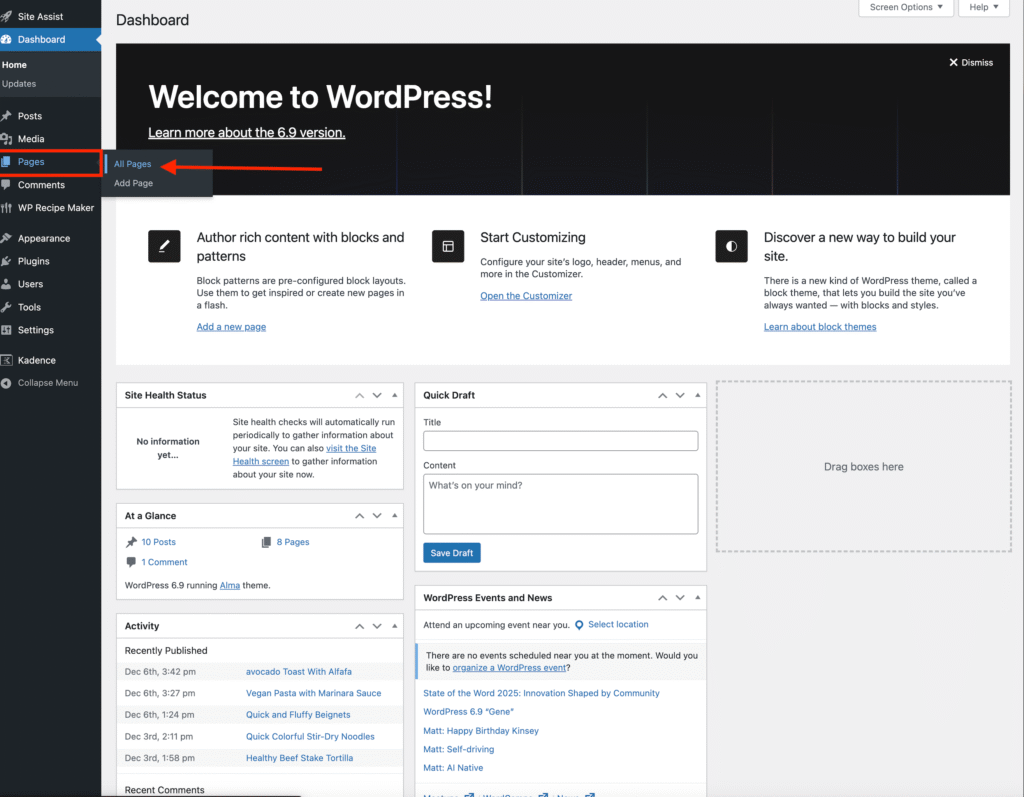
  • In your WordPress dashboard, go to Pages → All Pages.
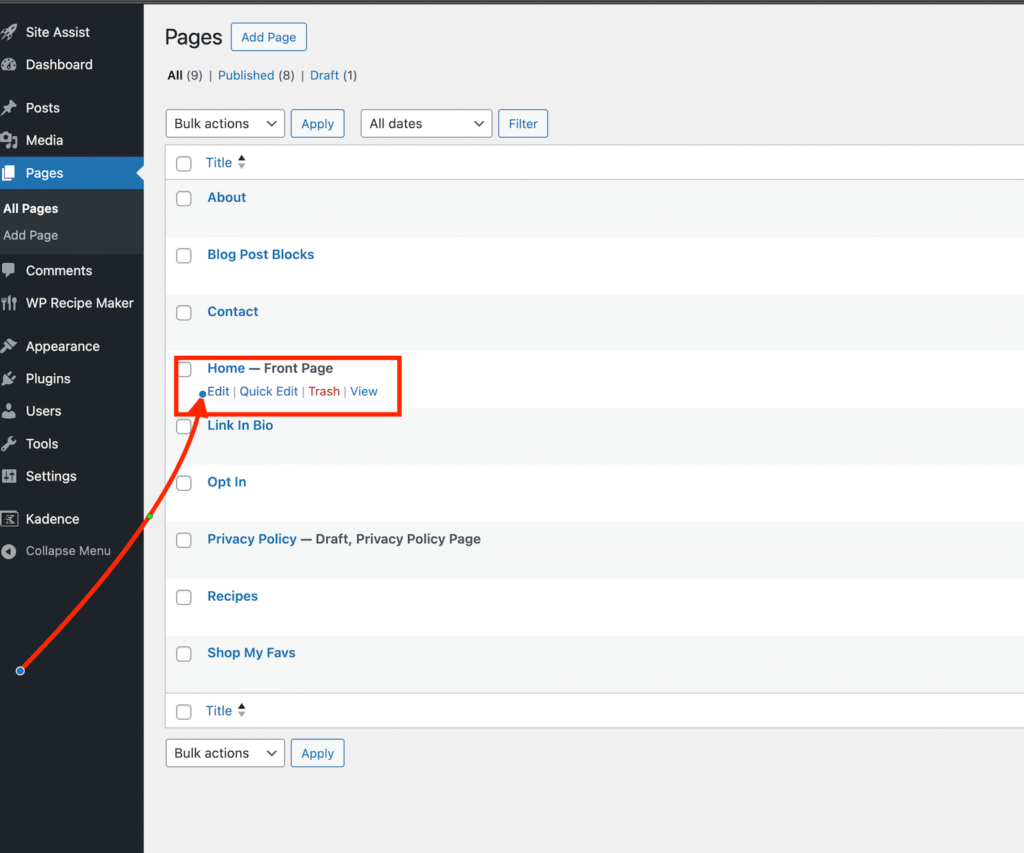
  • Find the page where the blog tabs are located (for Alma, this is the Home Page) and click Edit.
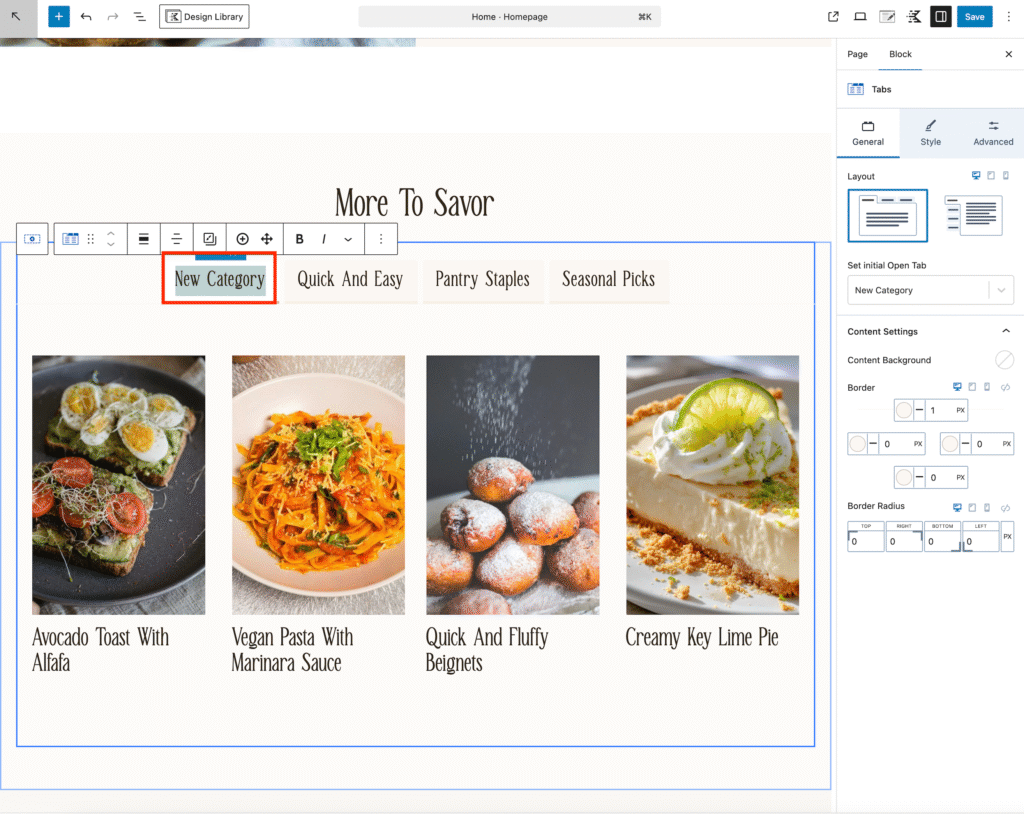
  • Click on the blog tab section to open the Tabs Settings.
  • Click on the demo category text and replace it with your own category title.
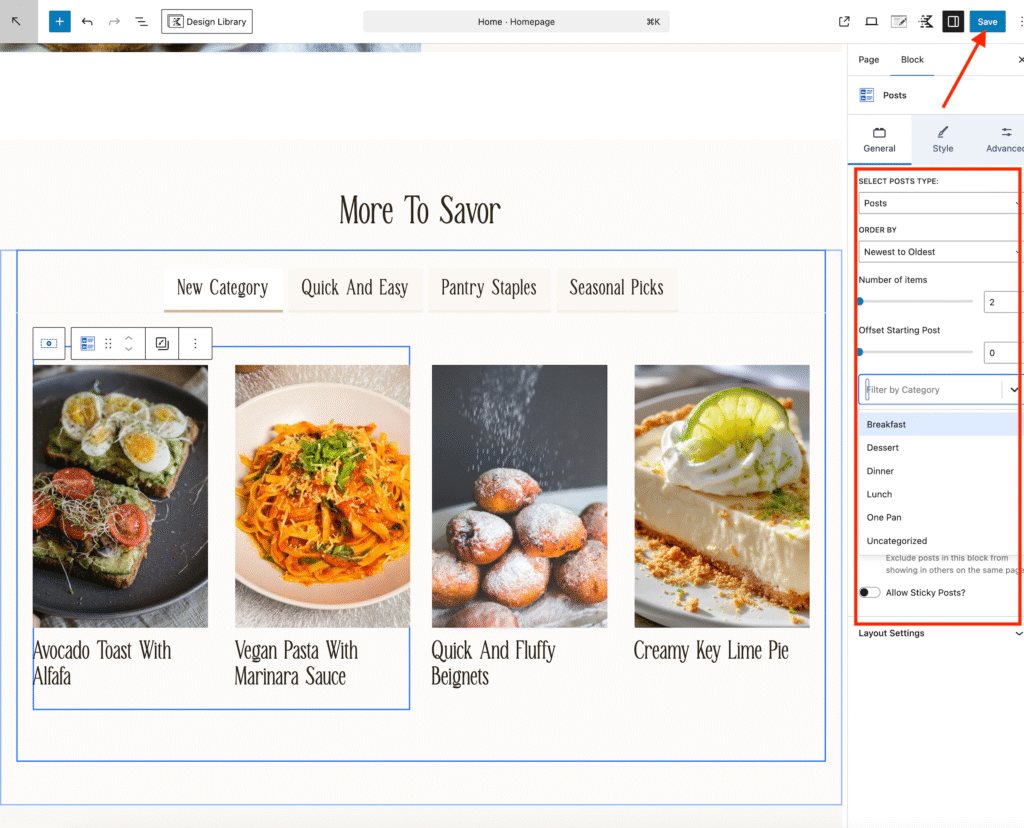
  • Click the blog posts to select the section.
  • In the right-hand sidebar, you can:
    • Choose which category of blog posts to display by using the filter by category dropdown button
    • Set how many posts appear in the tab by using the number of items slider
    • Adjust the order of the posts by using the order by button.

Repeat this step for each tab you want to customize.

Once you’re done, click Save to apply your changes.
Editing Header SectionInstall Your Theme and Import Demo Content

Leave a Reply Cancel reply

Your email address will not be published. Required fields are marked *

COPYRIGHT §2025 VANHA KOTI STUDIO

  • THEME SET UP & TUTORIALS
  • Submit A Ticket